
GuardWare DISCOVER is a cross-platform system that locates and manages sensitive data across endpoints, file servers, email systems, and cloud services. It identifies PCI, PII, and other custom data types, providing remediation options to reduce risk and maintain data security.
How GuardWare DISCOVER Works
GuardWare DISCOVER operates in a three-tier architecture and features two scanning modes: Agent-based and agentless.
-
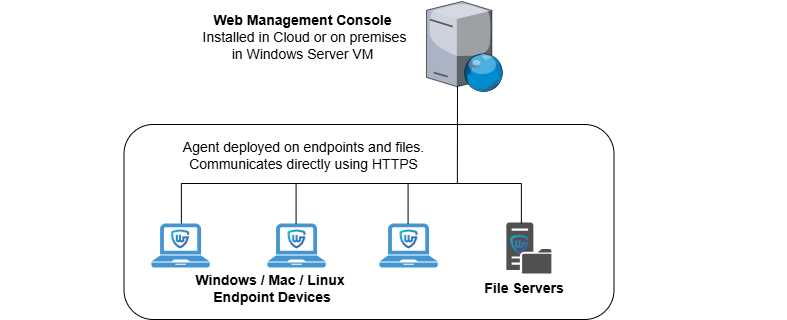
Agent Mode: In Agent-based scans, the DISCOVER Agent performs scanning and remediation actions locally on the device where it is installed.
-
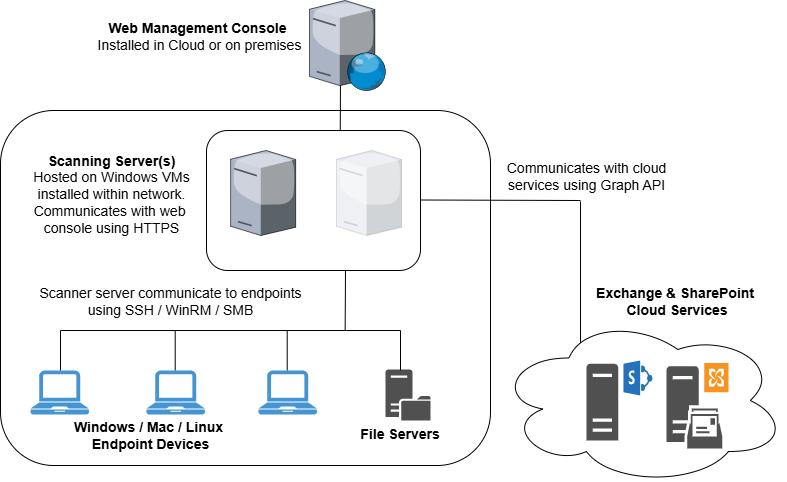
Agentless Mode: In agentless scans, the DISCOVER Agent connects to remote devices and services over the network to perform scanning and remediation operations.
-
DISCOVER Server (First tier):
Hosts the Management Console, stores scan results, and coordinates scanning tasks. It runs on Windows Server with IIS and provides central administration for scan scheduling, reporting, and remediation. -
DISCOVER Agent (Second tier):
Installed on endpoints or dedicated virtual machines, the Agent receives instructions from the server and executes them. For target devices, it connects via SSH or WinRM to perform scans. In contrast, for cloud services, it leverages a registered Azure AD Agent and uses Microsoft Graph API with OAuth 2.0 to perform secure scans. -
Remote Target Devices & Services (Third tier):
Includes endpoints, SMB (Server Message Block) file servers, Exchange Online, and SharePoint Online.
Deployment Overview
Deploying GuardWare DISCOVER for scanning involves setting up the server, installing the Agent, and optionally configuring remote access for agentless scanning mode.
-
Verify System Requirements: Ensure hardware, software, and network prerequisites are met.
-
Install the GuardWare DISCOVER Server: Set up MySQL, PRedis, Visual C++, the DISCOVER Server on Windows Server, and the IIS Rewrite Module. (See Server Installation and Setup Guide)
-
Install the GuardWare DISCOVER Agent: Deploy the GuardWare DISCOVER Agent on an endpoint or a dedicated VM. (See Agent Installation: Endpoint and Agent Installation: Scanning Server)
-
Configure and Run Scans: Set up data classifications, data owners, types, and targets, then initiate scans. (See Quick Start Guide)
For a thorough understanding of the Management Console, see GuardWare DISCOVER: Management Console Detailed Guide.
Navigating the DISCOVER Management Console
Familiarizing yourself with the Management Console is essential, as all administrative and operational tasks are performed there. Functions are organized into tabs, grouping related tools in the navigation menu for ease of access.
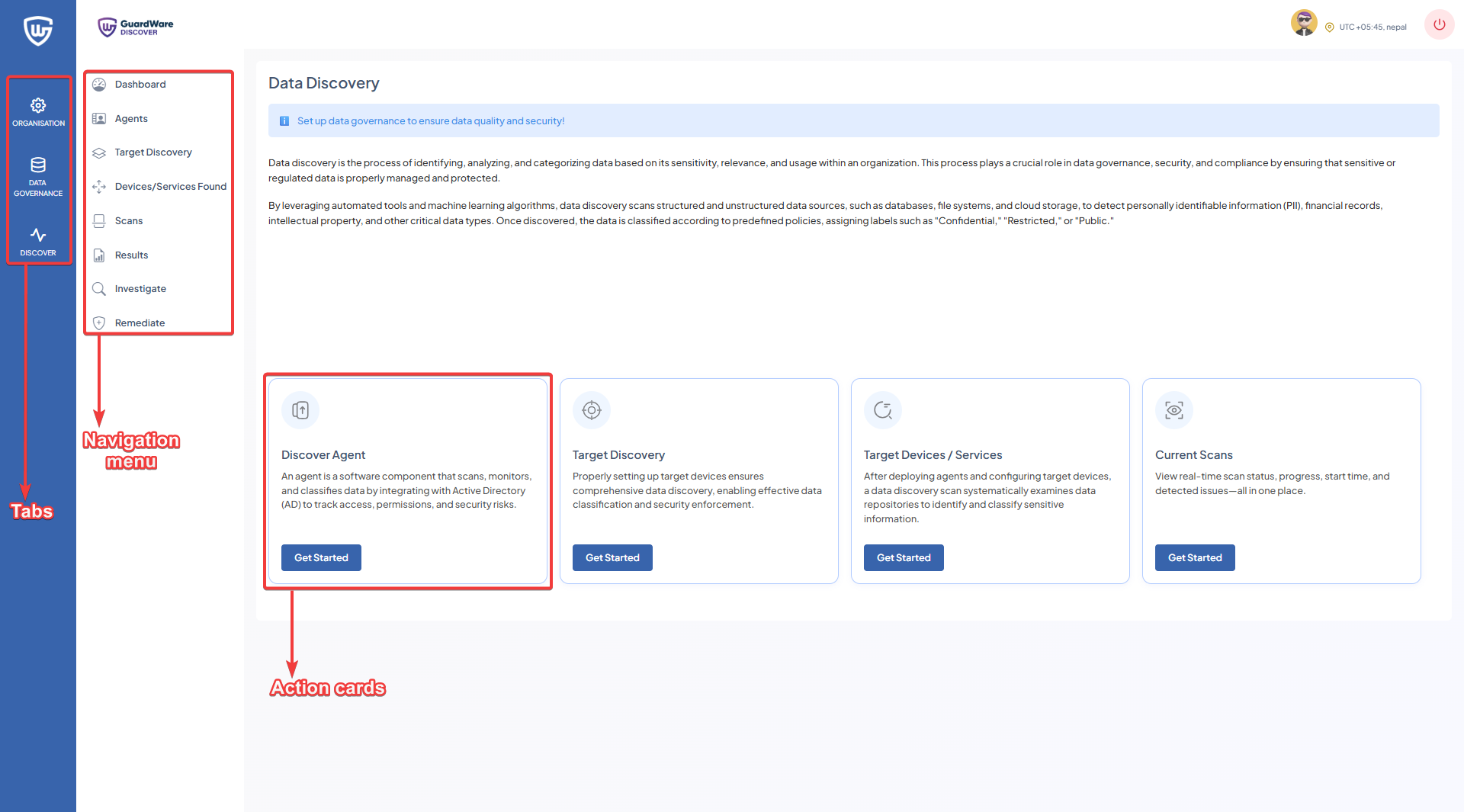
To access the console, log in with your Super Admin credentials and complete the two-factor authentication (2FA) using an authenticator app. First, set up the GuardWare DISCOVER server and then refer to the Quick Start Guide for quickly configuring and starting scans.
Terminology and Key Definitions
The following is a list of terminology and its definitions that you will come across.
|
Term |
Definition |
|---|---|
|
Agentless Scan Mode |
A scan initiated remotely by GuardWare DISCOVER, connecting to target devices over protocols such as WinRM (for Windows) to look for sensitive data. |
|
Agent Scan Mode |
Local scan performed by GuardWare DISCOVER in an Agent-installed device. |
|
Data Classification |
The process by which users group sensitive information in GuardWare DISCOVER. |
|
Data Owner |
The individual accountable for a data type who receives notifications when GuardWare DISCOVER detects sensitive data. |
|
Data Types |
Categories of information, either predefined (e.g., PCI-DSS, PII) or user-defined, that GuardWare DISCOVER scans for. |
|
Device Owner |
The user or administrator responsible for a device scanned by GuardWare DISCOVER or where sensitive data resides. |
|
File Servers |
File shares accessible via SMB, scanned by GuardWare DISCOVER to detect sensitive data. |
|
GuardWare DISCOVER |
A GuardWare solution for discovering, classifying, and remediating sensitive data across endpoints, file servers, email systems, and cloud-based services. |
|
GuardWare PROTECT |
A GuardWare solution that applies encryption and persistent protection to files, optionally integrated with DISCOVER for encryption of sensitive data. |
|
Internet Information Services (IIS) |
Microsoft’s web server platform used to host and manage the GuardWare DISCOVER web console and its associated services. |
|
Investigation |
Process for reviewing and analysing files flagged during scanning for potential sensitivity risks. Select a file to investigate its contents and determine the appropriate action. |
|
Microsoft Azure |
Microsoft’s cloud computing platform to scan Azure-based services like Exchange Online and SharePoint Online for sensitive data. |
|
Microsoft Azure Agent |
An Agent registered in Microsoft Entra ID (previously Azure AD), providing GuardWare DISCOVER with Tenant ID, Client ID, and Client Secret credentials to authenticate and access Microsoft 365 services via the Microsoft Graph API. |
|
Microsoft Entra ID (previously Azure AD) |
Microsoft’s cloud-based identity and access management service that authenticates GuardWare DISCOVER’s access to Microsoft 365 services through registered Agents. |
|
Microsoft Exchange |
Microsoft’s email and calendaring platform (on-premises or online as Exchange Online). |
|
Microsoft Graph API |
A unified RESTful API endpoint used by GuardWare DISCOVER to securely access and scan Microsoft 365 data sources, including Exchange Online and SharePoint Online, using OAuth 2.0. |
|
Microsoft Intune |
Microsoft’s endpoint and mobile device management service, not directly scanned by GuardWare DISCOVER, but potentially used alongside it for device compliance and policy management. |
|
Microsoft SharePoint |
Microsoft’s collaboration and content management platform. |
|
Network |
The communication infrastructure, including protocols and connectivity that enable GuardWare DISCOVER to access and scan target endpoints, servers, or services. |
|
OAuth 2.0 Authentication |
An authorization framework to securely access Microsoft 365 cloud services (e.g., Exchange Online, SharePoint Online) via the Microsoft Graph API. |
|
Organisation |
An entity within the GuardWare DISCOVER web console representing a company or customer environment. |
|
PCI-DSS Data |
Payment Card Industry-regulated data, such as credit card numbers, recognised by GuardWare DISCOVER as a part of its predefined sensitive data type. |
|
Remediation |
The structured process of resolving sensitive data, such as deleting, moving, or encrypting facilitated by GuardWare DISCOVER. |
|
Scan |
The process by which GuardWare DISCOVER inspects files, emails, or services against defined policies to identify and classify sensitive data. |
|
Sensitive Data |
Confidential or regulated information (e.g., PCI, PII, intellectual property, etc.) that GuardWare DISCOVER scans for. |
|
Services |
Platforms or systems (e.g., Exchange Online, SharePoint Online, SMB file shares). |
|
SSH |
Secure Shell (SSH) protocol used by GuardWare DISCOVER for secure remote connections to target devices and services during agentless scanning. |
|
Target |
Any endpoint, server, or service designated within GuardWare DISCOVER as a location to be scanned for sensitive data during agentless scans. |
|
Virtual Machine (VM) |
A virtualized environment hosting the GuardWare DISCOVER Agent to facilitate agentless scanning or management tasks. |
|
WinRM |
Windows Remote Management protocol, used by GuardWare DISCOVER to establish secure connections to Windows devices for agentless scanning. |